
Many web applications have to process files and store them for the long term. When defining a system architecture, the same question therefore comes up again and again: where should these binary large objects (blobs for short) live? Below, we look at the downsides of storing blobs in the database and at the alternatives.
Simple user stories such as
As a user, I want to be able to upload a profile photo.
or
As a user, I want to be able to attach an Excel or PDF file to my domain object.
tempt you to choose a supposedly simple technical solution: storing the profile photo or the Excel or PDF file directly in the database. That's why the following excerpt of a database model can be found in many applications:
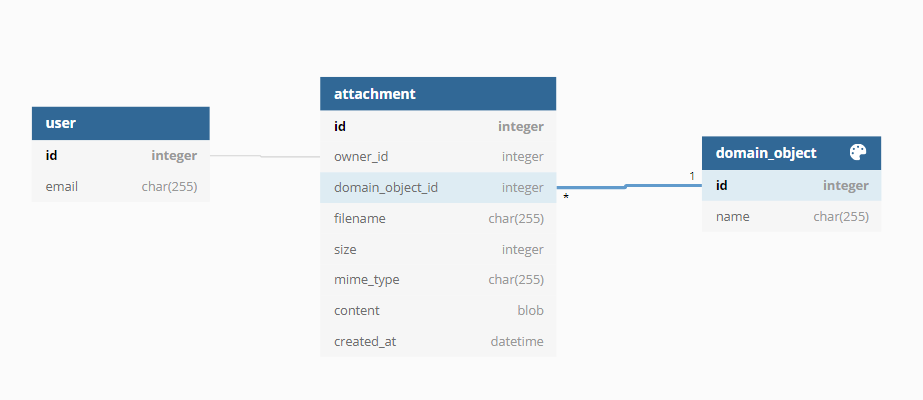
Depending on the framework, storing the byte stream in the attachment table is implemented quickly. Permissions for the download can easily be added later, and the user story is done. During testing or a go-live with few users and little load, the application works as intended. For now, the client is happy.
What storing blobs in the database means
Direct consequences
Storing attachments in the attachment table makes the database grow. Compared with plain (text) data, blobs contribute the most to that growth. This means:
- The filesystem holding the database, for example
/var/lib/postgres, fills up over time. - Database exports take longer.
- The load during replication increases.
The database can grow much faster than planned. With SaaS applications, this often happens in the early phase due to a rapidly growing user base. Or bugs crept in during implementation, or edge cases weren't considered:
- Existing files aren't replaced when uploaded again but stored additionally.
- There is no limit on the size of attached files.
A filesystem filling up
Depending on the partitioning, a full filesystem can mean you can no longer log in via SSH without further ado. In the simplest case, the database no longer accepts writes. Changes to other tables fail too, and the application is only partially usable.
Since the blobs can't simply be deleted from the database, you either have to enlarge the filesystem or move the database to a filesystem with free space.
Longer exports
The more data the database holds, the longer an export takes. In the short term this is negligible; in production it can become a problem over time.
It gets more critical when data from the production database is regularly anonymised and exported for the QA environment. In a CI/CD process this can happen several times a day and creates additional load on the production database. Ask yourself whether you really need data that is hours or even minutes old. Otherwise, you can cache exports and reuse them.
If the latest state of the production database has to be imported, exclude the attachments from the export. Depending on the environment, this takes effort and makes the export more complex.
Higher replication load
This affects applications where horizontal scaling of the database is already planned: more replication load is created between the primary and secondary nodes. In unfavourable cases, replication can fall out of sync.
Restoring individual blobs
Compliance requirements may make it necessary to keep a history of records or to keep them restorable. History can be implemented by storing a new tuple for each new blob. That, however, means every version of a blob is stored in full in the database.
Oracle's Advanced LOB Deduplication allows deduplication. MySQL and PostgreSQL don't offer such a feature.
Follow-up problems in development
The problems described so far seem rather theoretical during development. In operations, database administrators or the DevOps team are responsible anyway.
But as soon as parts of the application have performance problems, the development team is asked first. The following sequence diagram shows the flow when blobs are loaded from the database. The blob service stands in for an application server, a microservice, a web server or even a PHP script.
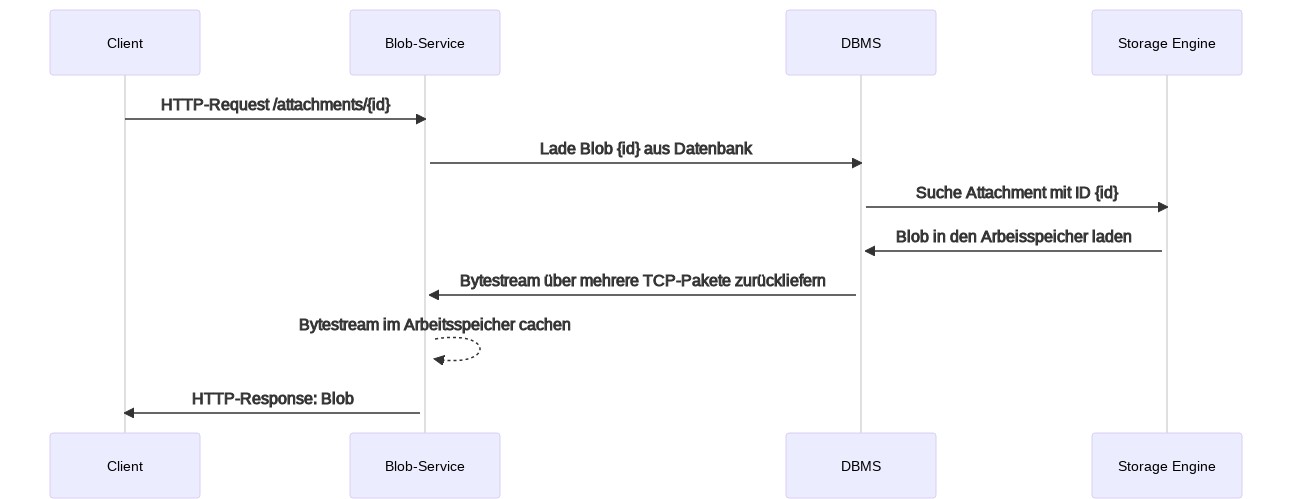
For every blob requested, both the blob service and the database management system are involved. Response times go up.
Memory consumption
For every requested blob, the service first looks up the matching tuple in the database. The DBMS returns the record via TCP; the service extracts the blob and passes it on to the web or application server.
With classic applications, this leads to high memory consumption: the entire byte stream has to be held in memory during the request. For a 20 MB file, both the DBMS and the blob service use an additional 20 MB of memory. Just a few concurrent requests can exhaust the memory completely.
Reactive applications, for example with Spring WebFlux and R2DBC, can deliver the blob to the client in individual chunks and thus minimise memory consumption. In return, the application becomes more complex.
Uploading blobs
Besides downloads, you also have to consider uploads. Depending on the technology, the right parameters need to be set so larger files can be uploaded at all:
| Platform | Configuration parameters |
|---|---|
| PHP | upload_max_filesize and post_max_size |
| MySQL | max_allowed_packet |
| Spring Boot | spring.servlet.multipart.max-file-size and spring.servlet.multipart.max-request-size |
You also need enough memory; otherwise Java applications crash with java.lang.OutOfMemoryError: Java heap space. For PHP applications, you may additionally have to adjust memory_limit if the file is processed in memory, for example when compressing or resizing images.
Caching
To reduce response times, the blob service can use caching. Caching the blobs themselves in memory isn't practical because of their size. Instead, the blob service uses the HTTP header Cache-Control to control when the client should request a new version.
Storing blobs outside the database
To avoid these problems, two alternatives come into question:
- The blob service serves the files directly from the local disk or a distributed filesystem (e.g. NFS or EFS). The metadata stays in the database.
- A dedicated object storage is used, such as AWS S3, Azure Blob Storage, MinIO or NetApp StorageGRID. The metadata lives in the database and/or in the object storage.
Serving from the filesystem
Web servers are built to serve static content, including uploaded files, efficiently. If the blob service handles delivery, this can happen with or without the web or application server being involved. The metadata stays in the database, so the application can show information about the file directly.
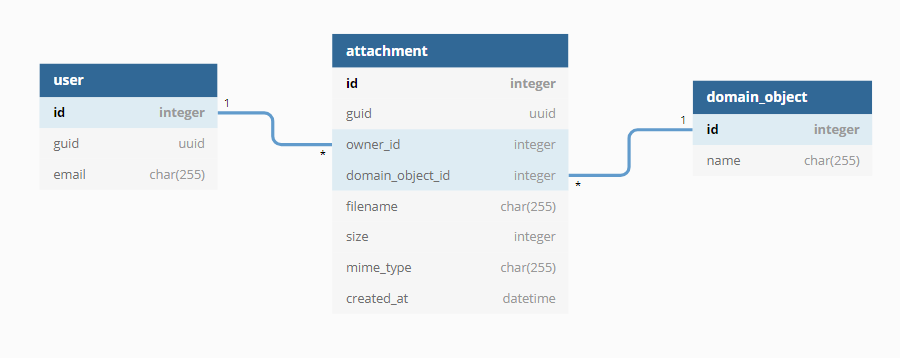
In both cases, the files live in the attached filesystem. Your backup strategy can include them, so older versions can be restored as well.
Redirect via a URL
The application generates a URL pointing to a directory that the web or application server serves directly. The files are kept in a directory structure that contains the context, for example the GUID of the current tenant. The file name is replaced with a random ID.
Advantages:
- Comparatively easy to implement
- Very fast, because the web server alone serves the files
- Compression during transfer is handled directly by the web server
Disadvantages:
- Authorisation is not possible, or only with additional effort on the web server side.
- An obfuscated file name is not a security measure.
- Customers often don't want obfuscated file names.
Delivery by the blob service
On a request, the blob service generates the right HTTP headers from the metadata, including the original file name. It then loads the file and sends the byte stream to the client.
Advantages:
- Authorisation happens in the application. Guessing URLs leads nowhere.
- The original file name, MIME type and other metadata are kept during the download.
Disadvantages:
- Additional memory is needed during the download.
- The download logic has to be implemented in the application.
Delivery via an object storage
Object storages specialise in providing individual files via a unique URL. With AWS S3 or Azure Blob Storage, you can create time-limited URLs through which a file can be downloaded or uploaded. Depending on the provider, there is versioning and the option to move files to slower and therefore cheaper storage classes.
Although S3, for example, can store metadata too, it is often kept in the database as well. This reduces requests to the S3 API.
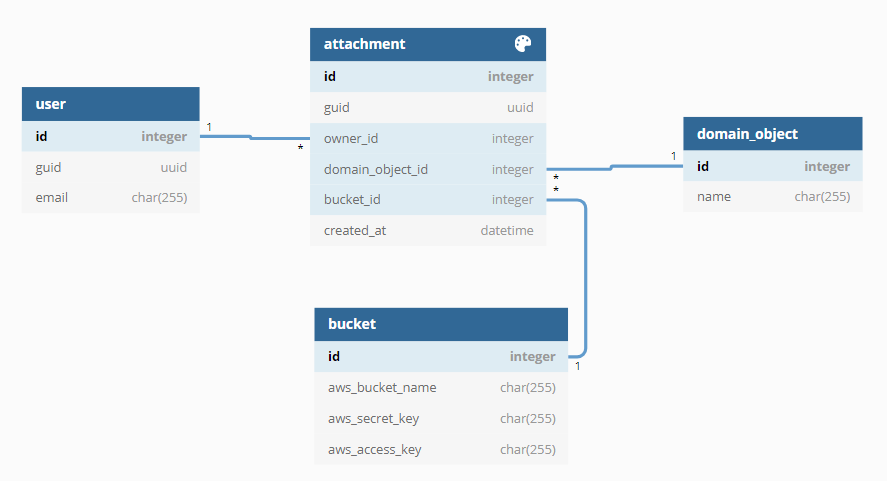
Advantages:
- Upload and download are moved completely out of the application. When you need to scale later, you can put a CDN such as CloudFront in front.
- Backups are handled by the object storage provider.
Disadvantages:
- Possible compliance issues if the files are stored with a cloud provider
- Depending on the product, additional costs for traffic and API requests
Risk and cost assessment
| Storing blobs in … | Risk | Expected cost factors |
|---|---|---|
| Database | High | Damage to your reputation at go-live due to poor runtime behaviour, analysis of performance problems, vertical scaling with more CPU, network, memory and disk, later migration of the data to one of the other solutions |
| Local or distributed filesystem | Medium | Vertical scaling with more disk space; a later migration to an object storage is comparatively easy |
| Object storage | Low | Costs for API requests and traffic |
Conclusion
Even though storing blobs in the database looks tempting at first glance, we advise against this architecture decision. Depending on your risk assessment and budget, we recommend either a local or distributed filesystem with delivery by the application, or a suitable object storage.
Want to validate an architecture decision like this before it gets expensive? That's exactly what our advisory and our architecture review are for.
Originally published on September 3, 2021.