
Many web applications need to provide files for download, for example when users have to download contract documents as PDF files. As soon as you look closer, you typically end up with requirements like these:
- REQ#1: As a user, I want to download files from the application.
- REQ#2: As a user, I want to send the download link to another person.
- REQ#3: As a user, I want to download a file later, even if I'm not logged in.
- REQ#4: As a security officer, I want files to be downloadable only by eligible users.
- REQ#5: As a compliance officer, I require files to be kept on our own hosted storage and not in a cloud environment.
- REQ#6: As a compliance officer, I don't want a user to reuse the same download link later.
- REQ#7: As a DevOps engineer, I want all credentials to be rotated automatically at regular intervals.
- REQ#8: As a software architect, I want file downloads to be handled in their own deployable module or microservice.
There's a lot to consider. REQ#2 and REQ#3, for example, are in direct conflict with REQ#4. One possible solution is one-time links (OTL).
One-time links
By definition, a one-time link can only be used once. It starts a file download and loses its validity after the first use.
Before an OTL is generated, a random marker such as a GUID is stored, for example in a database table or a shared cache. When the link is clicked for the first time, the service checks whether the marker still exists. If it does, the marker is deleted and the user gets the file. If not, the user sees an error message.
Set a lock when reading the marker. Otherwise, parallel requests could allow the same file to be downloaded twice.
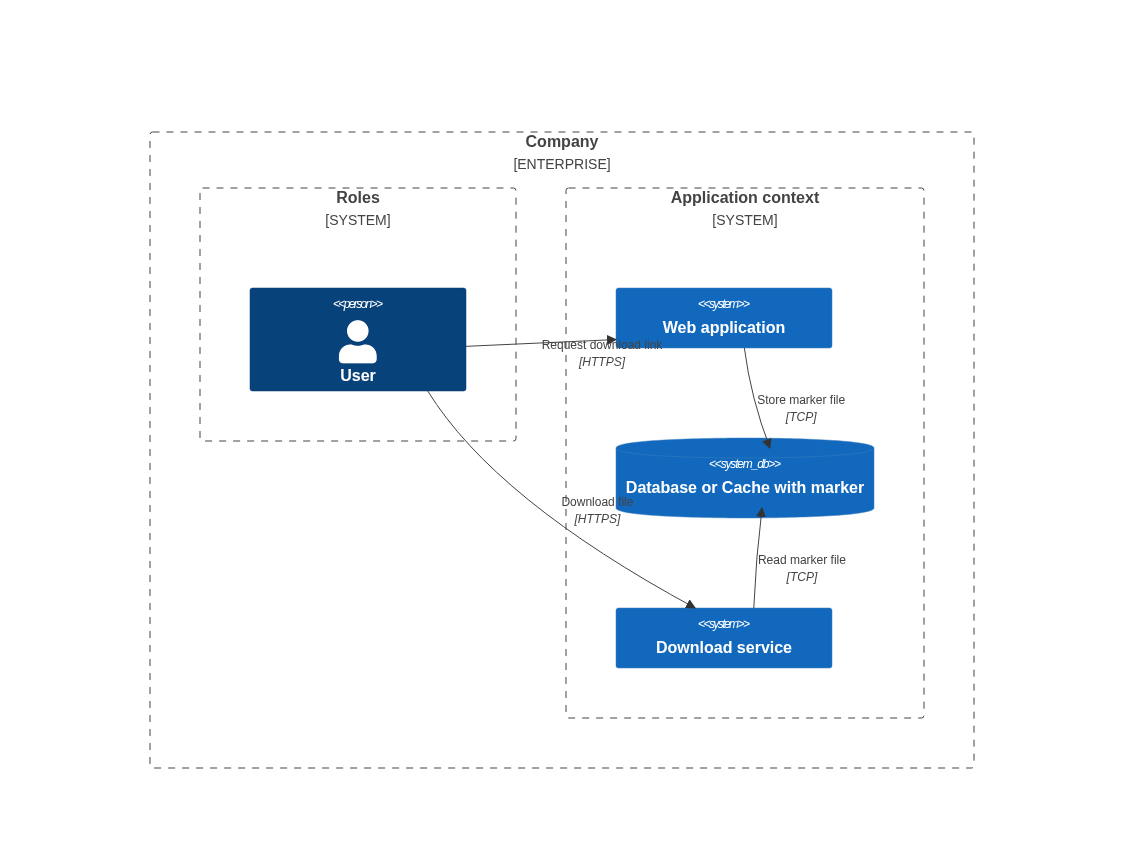
Ask yourself first: do your requirements really demand that a file can be downloaded only once via a link? Credentials or certificate files may need to be generated and downloaded exactly once. In most other cases, it is enough that the link no longer works a little later.
Pseudo one-time links
In practice, links that are only valid for a short time are also called one-time links. We call them pseudo OTLs here.
Unlike OTLs, pseudo OTLs don't need a stored marker. Instead, the link carries an expiry date and a signature. The expiry date is the current time plus the validity period of the link (TTL, time to live). The signature is created and verified with a shared secret (a pre-shared key or a certificate) and ensures that the expiry date hasn't been tampered with.
With a short TTL, the file can only be downloaded within a very limited time window. Within that window, however, the link can technically still be clicked several times and forwarded to other people.
In AWS S3 and MinIO, pseudo OTLs are available as presigned URLs; in Azure Blob Storage, you get the same with SAS tokens. If you implement them yourself, for example because the files are stored locally, the flow looks like this:
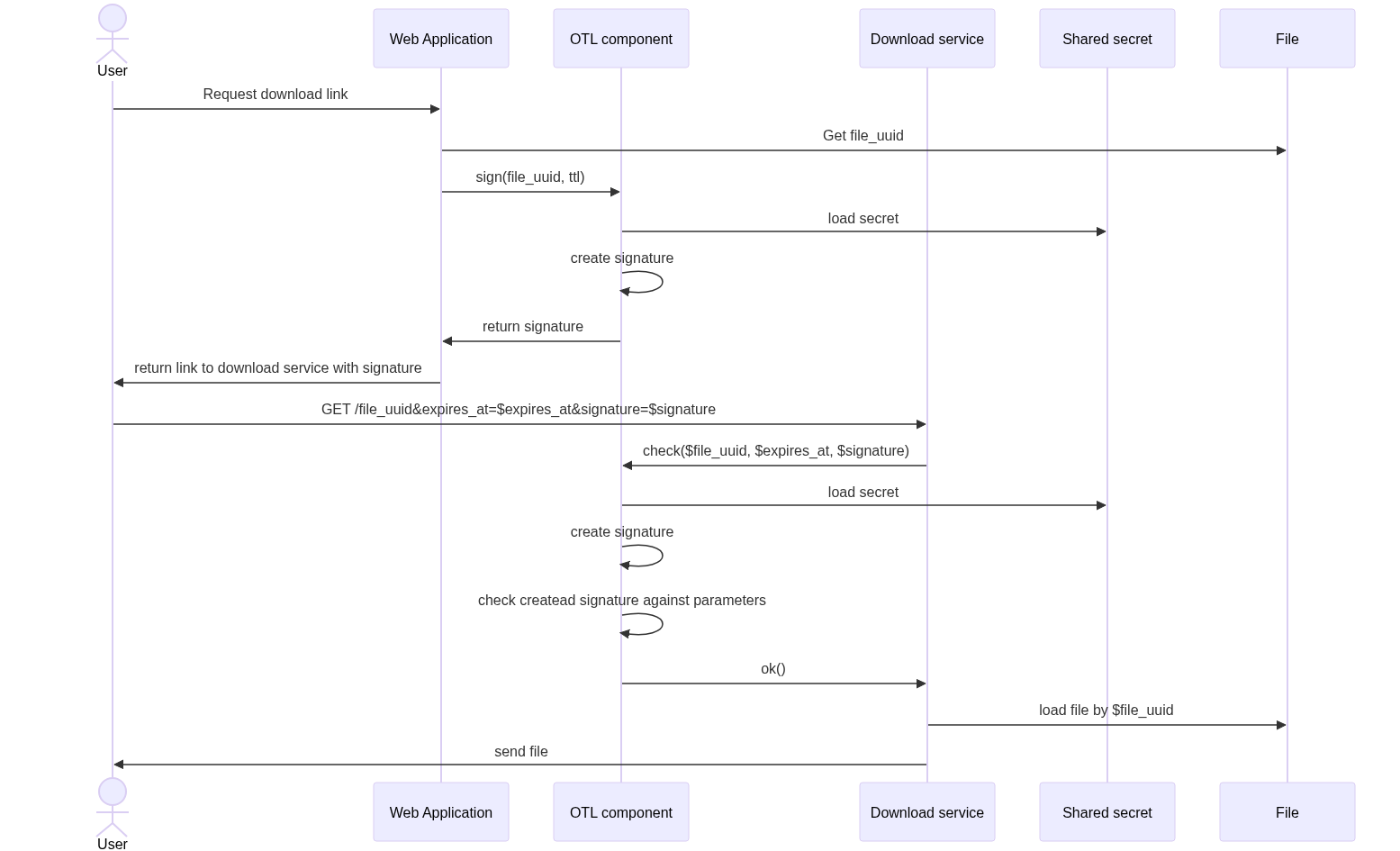
In pseudocode:
// `keyStore` is a facade for your key or certificate store, e.g. Vault

createSignedUrl(fileId, expiresAt):
    key = keyStore.newestActiveKey()
    url = "/files/" + fileId + "?expires_at=" + expiresAt.toIso8601()
    return url + "&key=" + key.id + "&signature=" + sign(url, key)

sign(value, key):
    // HMAC-SHA256 with a pre-shared key, or RSA/ECDSA with a certificate
    return hmacSha256(value, key.secret)

isValid(request):
    expiresAt = request.param("expires_at")
    signature = request.param("signature")
    key = keyStore.findActive(request.param("key"))

    if expiresAt is missing or signature is missing or key is missing:
        return false
    // the link must not be used after its expiry date
    if now() > parseIso8601(expiresAt):
        return false

    url = "/files/" + request.pathSegment + "?expires_at=" + expiresAt
    // compare in constant time to avoid timing attacks
    return constantTimeEquals(sign(url, key), signature)
Things to consider
Time zones
Make sure all servers either use the same time zone or handle time zones correctly. If the link is created in time zone A, checked in time zone B (which is ahead of A), and the expiry date carries no time zone information, the check fails. So always include the time zone, ideally as an ISO 8601 timestamp in UTC, or configure all environments identically.
Shared secrets and key rotation
Both the service that creates links and the service that delivers files must know the shared secret or certificate or use the same signing component.
If secrets are rotated regularly (REQ#7), take that into account from the start: during a transition period, keep two keys valid at the same time. New links are signed with the newest key, and verification also accepts the previous one. Once the transition period is over, you deactivate the old key. The transition period must be longer than the validity of a link.
That's why the pseudocode above sends a key ID (key) with the link. With certificates, the certificate's fingerprint serves the same purpose. This way, the verifying service loads the right key directly instead of trying all of them.
What should you choose?
Pseudo OTLs are often the better choice: you don't need additional persistence, and a later migration to an object storage such as S3, Azure Blob Storage or a self-hosted MinIO is easier. Real OTLs are worth the extra effort when a file really may only be retrieved once, for example for credentials or certificates.
In the end, as always, it depends on your concrete requirements. If you want a second opinion on your download architecture, ask us in our advisory.
Originally published on September 9, 2025.